DF-S02 · SolutionShipping
PCIe FABRIC · GEN4

PCIe Fabric Expansion Platform.

A PCIe Gen4 fabric backplane (Tier-1 US PCIe switch silicon inside) that lets you route any endpoint — accelerators, SSDs, NICs — to any host. The foundation of composable, disaggregated architectures.

Ships inside DF-R4
OVERVIEW

One fabric. Any endpoint, any host.

PCIe Gen4 fabric switching that lets compute, accelerators, storage, and networking scale independently. Reassign endpoints on demand. Consolidate hardware across workloads.

The Datafabrix Gen4 Fabric Backplane is a PCIe Gen4 non-blocking switch that supports flexible endpoint-to-host binding. Deploy it as the composability layer under a rack of servers.

Built on PCIe Gen4 Fabric Backplane Shipping today
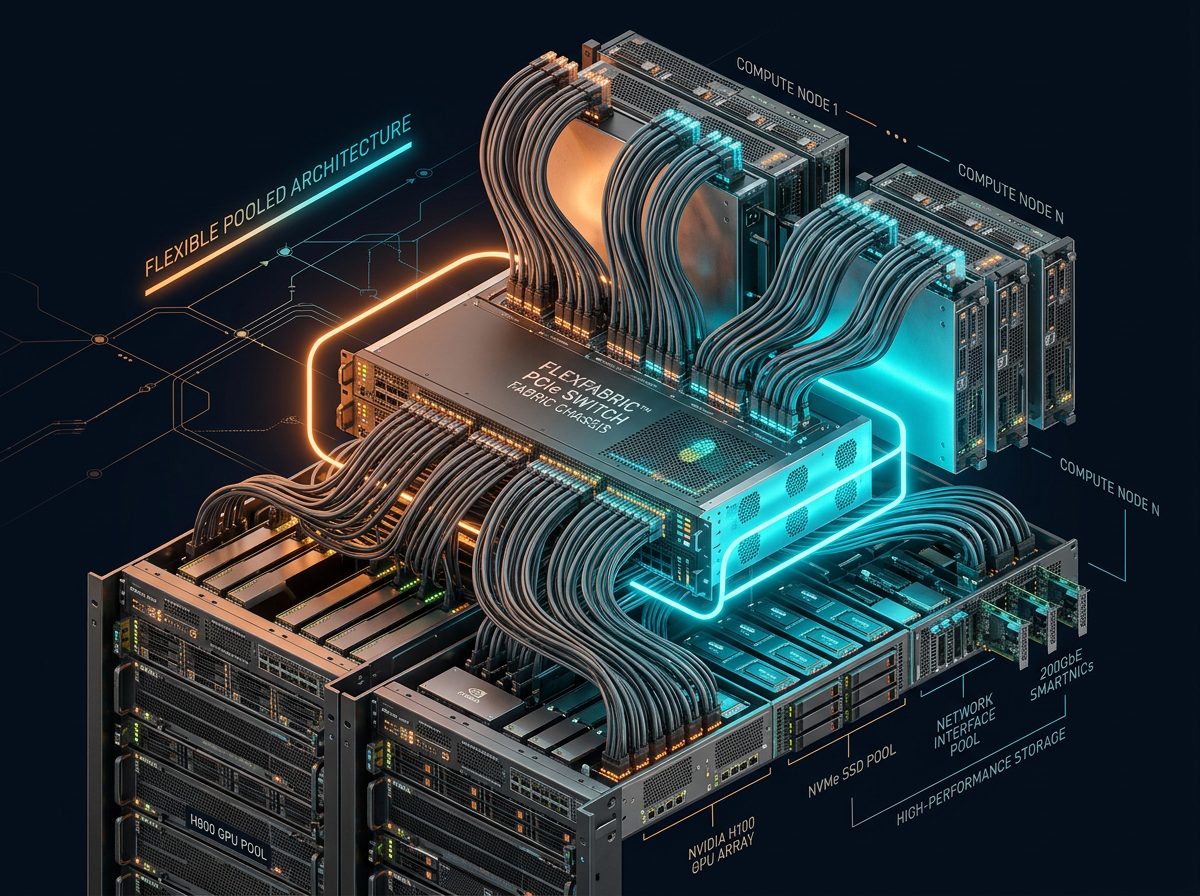
PCIe Fabric Expansion Platform.
ARCHITECTURE

Solution block diagram.

The block diagram shows the PCIe Fabric Expansion Platform as a "PCIe any-to-any" switch. Multiple host servers cable-attach into the fabric via PCIe HBAs. Behind the fabric sits a mix of endpoints — NVMe, GPU, DPU, FPGA, custom PCIe cards — that any host can claim through the control plane. Hot-plug, live-migrate, and multi-host zoning are all native operations. The fabric is the composable data plane that turns fixed servers into a fluid resource pool.

Host PoolN servers Gen4 FabricNon-blocking Endpoint PoolGPU/SSD/NIC ComposabilitySW policy
DEPLOYMENT TOPOLOGY

Connection diagram.

The connection diagram maps a composable rack. Each participating host runs a short MCIO cable to the DF-S02 chassis. External endpoint chassis (JBOF, GPU box, DPU shelf) uplink to the same fabric. A dedicated management network reaches the composability control plane for on-the-fly endpoint reassignment. A+B power feeds keep the fabric hot during maintenance. Use this diagram to plan host-to-endpoint ratio, cable topology, and control-plane latency.

Server A Server B Server C Server D PCIe Gen4 Fabric Backplane PCIe Gen4 · Non-blocking · Composable GPU NVMe NIC FPGA
INTERFACE DETAILS

Interfaces & connectivity.

InterfaceDetails
Host lanesUp to 4× PCIe Gen4 x16 upstream
EndpointsPCIe Gen4 x4/x8/x16 downstream
ComposabilitySoftware-defined endpoint-to-host binding
ManagementRedfish · SNMP · DCIM-native
Hot-plugPer-slot supported
HOW IT WORKS

Detailed description.

The PCIe Fabric Expansion Platform decouples compute from accelerators, storage, and networking. Instead of over-provisioning every server with worst-case hardware, you pool endpoints behind the Gen4 fabric and bind them to hosts on demand.

The Datafabrix Gen4 Fabric Backplane switches at line-rate PCIe Gen4 — up to 16 GT/s per lane, non-blocking across all ports. Endpoint binding is enforced by software policy, letting orchestrators reassign resources between workloads.

This is the fabric under composable infrastructure. Whether you're running heterogeneous training jobs across a shared GPU pool, or dynamically scaling storage under a database tier, the fabric lets each workload get exactly the hardware it needs.

Applications

  • Composable infrastructure — Bind pooled endpoints to hosts on demand.
  • GPU pooling — Share expensive accelerators across multiple hosts.
  • Storage disaggregation — Separate compute from storage lifetimes.
  • NIC pooling — Reassign high-speed NICs to bursty workloads.
  • Development labs — Reconfigure test topologies without recabling.
USE CASES

Where this solution shines.

AI training bursts

Move GPUs into training jobs on demand; return them to inference between runs.

Multi-tenant cloud

Give tenants right-sized hardware without stranded capacity.

Research clusters

Reconfigure hardware per experiment, per user, per week.

SPEC HIGHLIGHTS

Technical specifications.

CategorySpecification
FabricPCIe Gen4 non-blocking switch
UpstreamUp to 4× PCIe Gen4 x16
DownstreamConfigurable x4/x8/x16 endpoints
ComposabilitySoftware-defined binding
ManagementRedfish · DCIM-native
TARGET INDUSTRIES

Who deploys this solution.

Composable InfrastructureHyperscalersHPCCloud ProvidersResearch
HOW TO DEPLOY · DF-S02

Deploying PCIe Fabric Expansion Platform in your infrastructure.

Where it fits in the rack, how it connects, and what you get after installation.

PCIe Fabric Expansion — between adjacent racks.
Deployment illustration · Pcie Fabric Expansion · DF-S02
42U Rack — customer datacenter Existing Host Servers / Compute DF-S02 · PCIe Fabric Expansion Platform PCIe Gen4 Fabric · Hot-plug ◀── This solution ──▶ Existing Storage Existing Network Ethernet Mgmt · Datafabrix DCIM · Fleet Control
RACK-LEVEL ARCHITECTURE

Where DF-S02 sits in your rack.

Rack-scale PCIe Gen4 fabric backplane (Tier-1 US PCIe switch silicon inside) that lets any endpoint attach to any host on demand. The solution slots into a standard 19-inch rack alongside your existing servers, storage, and network fabric — no re-architecture required.

Target deployments: Composable rack infrastructure where accelerators / storage / NICs must be re-assignable.

  • Cabling: standard PCIe host adapter → PCIe cable → DF-S02 chassis
  • Power: standard C13/C14 rack PDU, 1+1 redundant PSU option
  • Management: 10 GbE + IPMI/BMC out-of-band + Datafabrix DCIM integration
  • Cooling: fits standard rack thermal envelope, no liquid cooling required
01

Install in rack

Slide the DF-S02 chassis into a standard 19-inch rack slot. Rail kit included. Cable to your PDU and management network.

02

Connect PCIe host

Install the Datafabrix PCIe host adapter in your existing server. Connect via PCIe cable to the DF-S02 backplane uplink.

03

Populate the fabric

Insert NVMe drives, GPUs, or accelerators into hot-plug slots. Each device trains and appears as a native PCIe endpoint on the host.

04

Manage & scale

Optional: connect to Datafabrix DCIM for fleet-wide visibility. Add more chassis for horizontal scale — no host reconfiguration.

🎯

Composable datacenter racks

Direct rack integration alongside your existing production servers. Turnkey in a single deployment window.

📈

GPU sharing pools

Scale from a single chassis pilot to full-rack production with zero architectural change.

🔧

Storage disaggregation

OEM-ready configuration for organizations building their own branded infrastructure products.

Ready to design a rack around it?

Engineering pilots, reference designs, and OEM co-design programs — we work with your team from concept to production.